
Advanced Online Typing Speed Test
Improve your WPM (Words Per Minute) and accuracy with Auxin WebOut's free interactive typing practice tool. Perfect for data entry prep, programming, and competitive typing.
How to Test and Improve Your Typing Speed Online?
Testing your typing speed is the first step toward becoming more productive in digital workflows. Whether you are preparing for data entry jobs, programming, or simply want to chat faster, our advanced **WPM (Words Per Minute)** tool provides real-time analysis of your mechanical accuracy and velocity.
Choose your test duration (15s to 300s) and difficulty level from the control panel.
Click on the board and start typing the highlighted text. The matrix timer begins automatically.
Analyze your final WPM score, accuracy spectrum, and mismatch details instantly.
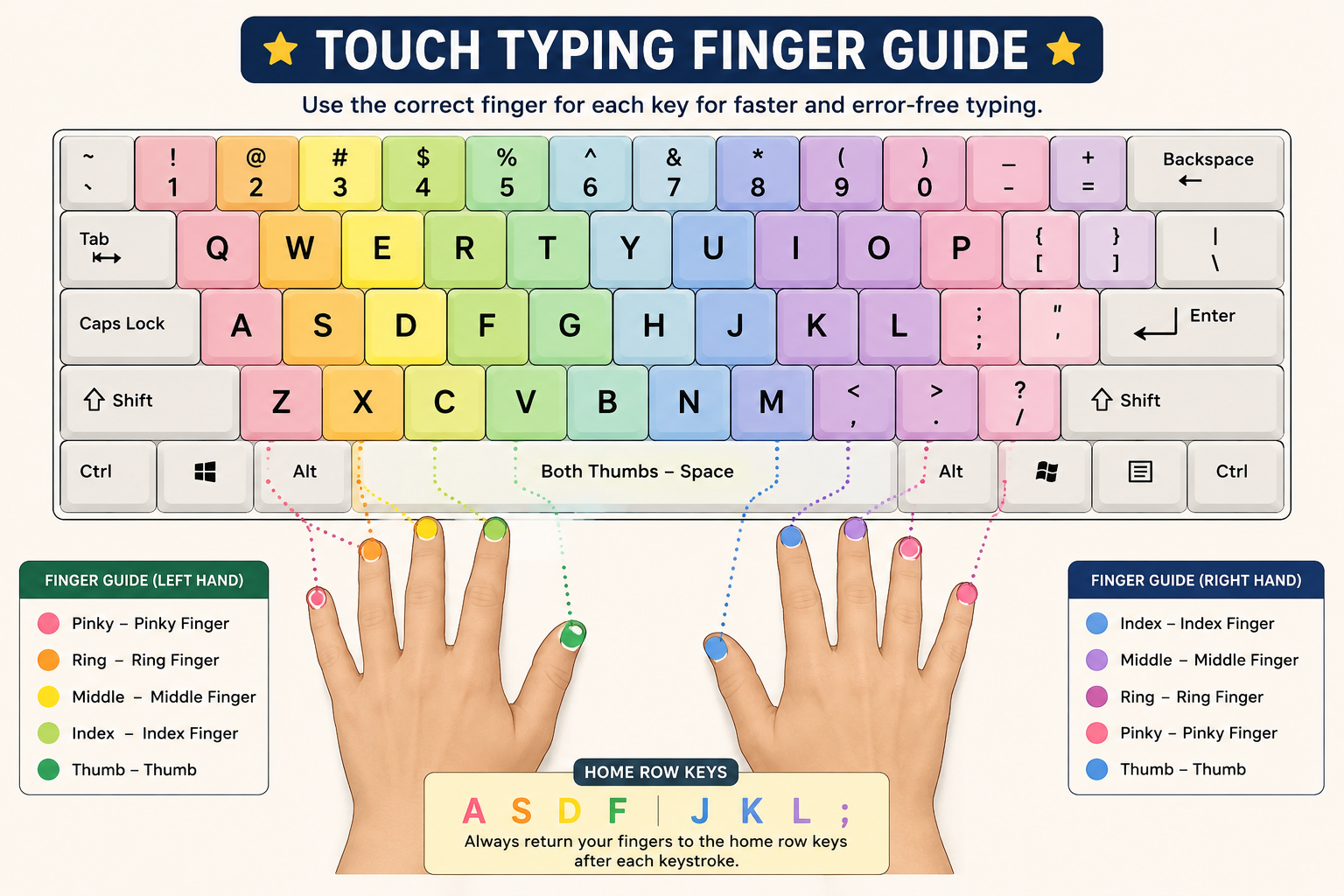
Mastering Touch Typing: The Perfect Finger Placement Guide
To achieve a high typing speed (above 60 WPM), you must stop looking down at the keyboard and utilize the **Touch Typing technique**. This system assigns specific keys to each finger, anchoring your hands on the **Home Row** (A, S, D, F for the left hand, and J, K, L, ; for the right hand).
Frequently Asked Questions (FAQs)
What is a good typing speed on a keyboard?
An average typing speed is around 40 WPM. Professional typists and programmers usually aim for 60 to 90 Words Per Minute, combined with an accuracy score of 95% or higher.
How is typing accuracy calculated?
Accuracy is calculated by dividing the number of correct keystrokes by the total keystrokes entered, mapped over your selected real-time diagnostic interval matrix.
Understanding Typing Speed Tiers: Where Do You Stand?
Different professional industries require varied benchmarks for mechanical typing. Below is a comprehensive diagnostic matrix outlining typing velocity tiers and their real-world applications:
| Speed (WPM) | Skill Tier | Ideal Ideal Roles & Efficiency |
|---|---|---|
| Under 30 WPM | Beginner / Hunt & Peck | Looking at keys frequently. Needs regular touch-typing matrix practice. |
| 30 - 50 WPM | Average / Casual Typist | Standard user speed. Good for basic emails, social media, and everyday web tasks. |
| 50 - 80 WPM | Professional / Advanced | Perfect for Data Entry Operators, Copywriters, Journalists, and Software Engineers. |
| 80+ WPM | Elite Master / Core Pro | Highest efficiency tier. Drastically cuts down administrative and development timelines. |
Advanced Training: How to Cross the 100 WPM Barrier
Building elite-level engine performance on a QWERTY keyboard requires systematic training. Implement these tactical parameters during your practice session routines:
- Prioritize Accuracy Over Raw Velocity: Typing fast with errors drops your overall index instantly due to penalization algorithms. Slow down to achieve 98%+ accuracy, and pure speed will follow naturally.
- Stop Using the Backspace Matrix: During standard layout training drills, avoid breaking your dynamic flow state to fix minor typos. Train your brain to hit the correct character sequence on the first pass.
- Maintain Perfect Ergonomic Positioning: Ensure your wrists are elevated slightly and not resting flat on the table layout. Keep an optimal 90-degree arm vector to eliminate long-term typing strain and muscle fatigue.
Dynamic Velocity Runs Finalized
Calculating metrics profile data...